


Fill and Sign Docs: Signeasy
4.01.81K Reviews
App Specs
- Version
- 16.8.0
- Updated On
- License
- Free
- Downloads
- 1,000,000+
- Developer
- Glykka LLC (dba SignEasy)
- Categories
- Business
- Platform
- Android, iOS
Screenshots

 Analysis by AppCompare
When a document lands in my inbox that needs a signature before the end of the day, I want to finish the job on my phone rather than hunt for a printer. That is the kind of task Fill and Sign Docs: Signeasy is built around: bringing a file in, adding the necessary marks, and getting it ready to send or store. I find it most useful when speed and convenience matter more than doing a complicated document review.
From an incoming file to a signed document
A practical way to judge an e-signature app is to follow the whole trip a document takes. For me, that starts with a form arriving by email or being saved in cloud storage. I open it in Signeasy, check that it is the right version, and then add a signature, initials, or other entries where the form asks for them. The goal is not just to make a mark on a screen; it is to leave the document in a state that is clear enough for the next person to use.
Where Signeasy fits in a busy day
As a business app from Glykka LLC, which operates as SignEasy, Signeasy is aimed at the everyday paperwork that otherwise creates a small but irritating chain of printing, signing, scanning, and emailing. I can see it helping a freelancer approve a document between appointments, a small-business owner complete a routine form away from a desk, or someone handling a lease or permission form while traveling. It is free to install, rated for Everyone, and has a four-point average from around twenty-two thousand ratings, with more than a million installs. That gives a new user a sense of its reach without telling them whether it suits every kind of paperwork.
The app has been around since June 2011, and version 16.5.0 supports devices running Android 7.0 or later. That matters if you are trying to use an older phone: check the system requirement before planning a document workflow around it. The free starting point is appealing for occasional signing, while in-app purchases range from about five dollars to around two hundred forty dollars per item. I would look at the purchase choices in the app before relying on it for frequent work, since the right value depends on how often you sign and whether you need to send documents to other people.
Getting the right file into the workflow
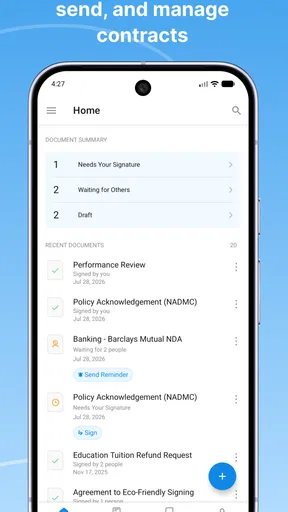
Right off the bat, Fill and Sign Docs: Signeasy impressed me with its clean and intuitive interface. I mean, who doesn’t love an app that doesn’t require a degree in rocket science to navigate? Everything is laid out clearly, and the minimalistic design ensures that you can find what you need without a ton of fuss.
Setting up the app was a breeze. After a quick download from the App Store, I was prompted to create an account, which took all of two minutes. The app supports multiple file formats like PDF, Word, and even images, so uploading documents is as easy as pie. You can pull files from cloud storage services like Google Drive and Dropbox or even snap a picture of a document using your phone's camera.
That range of ways to bring in a document is useful, but I would still start by checking the file itself. A clear, correctly oriented scan is easier to work with than a crooked photo with faint printing. If I am using the camera, I make sure all four edges are visible and that no important wording is lost in shadow. For a contract or form with several pages, I also confirm that the pages are in the intended order before I start filling anything in. These quick checks reduce the chance of having to redo the signature after spotting a missing page.
Worth Reading Before You Choose

EA SPORTS FC Mobile 26 Is a Bigger Football Game, but It Takes Time

Flipboard Shows What News Apps Must Do Beyond the Feed

Switching to Android Auto Means Rethinking Your Driving Routine

Google Calendar Makes a Crowded Week Easier to Manage

Ludo King Makes the Most of the Minutes Between Plans

Baby Panda World Brings Quick Play to Modern Phones, but Its Game Library Feels Busy
Placing marks carefully, not just quickly
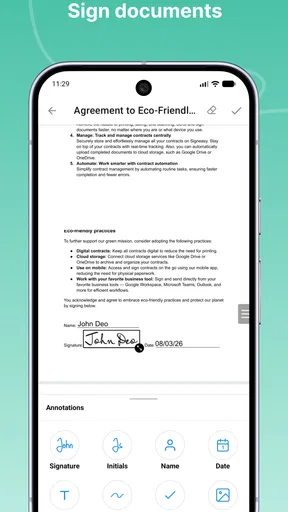
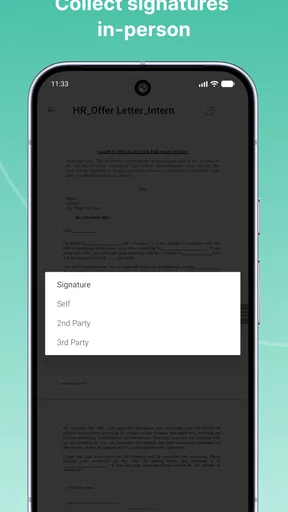
Now, let's talk about the real star of the show – the signing feature. It's super straightforward. You can either draw your signature with your finger or stylus, type it out in a fancy font, or even upload an image of your signature. Once you've got your John Hancock sorted, placing it on the document is as simple as dragging and dropping. And if you mess up? No worries, just undo and try again.
One really neat feature is the ability to add text fields, initials, and checkboxes to documents. It's perfect for those pesky forms that require a bit more than just a signature. Plus, you can resize and position everything to fit just right.
My practical tip is to zoom in and check the signature’s position against the printed line and nearby labels before finishing. A mark that looks correctly placed on a phone can overlap a date box or sit too close to the edge when the page is viewed at full size. For a form with multiple signature spots, I work from top to bottom and compare each one with the labels so initials do not end up in a full-signature field. The same care applies to typed entries and checkboxes: being able to position them is helpful, but it also means the user is responsible for making the result legible.
Passing the document to the next person
In a realistic handoff, I might receive a form from a colleague, fill in my section during a commute, then save or share the completed file so the colleague can continue the process. Signeasy’s connection with other apps and services can make that movement less awkward than exporting a file, searching for it in another app, and importing it again. Still, I would pause before sending anything and review every page at normal reading size. That final check is especially worthwhile when someone else will rely on the document or when the form has more than one field to complete.
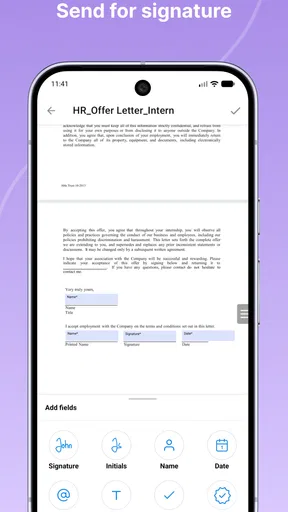
Whether a document is coming from email or being saved back to cloud storage, the handoff is where small mistakes become inconvenient. I make sure I am sharing the completed copy rather than an untouched original, and I give the file a recognizable name if I have a choice. That makes it easier for the recipient to identify the signed version later. For a document that still needs another person’s signature, I would also check which sending options are available to me before promising a particular process; the app’s paid plans are described as unlocking the ability to send documents for others to sign.
Security is part of the workflow
In today’s world, security is a big deal, and I was glad to see that Signeasy takes it seriously. The app uses SSL encryption to keep your documents safe and also allows you to add passcodes for an extra layer of security. Knowing that my sensitive info is protected while using the app gives me peace of mind.
That reassurance does not replace careful handling. I would use a passcode when a document contains personal or business details, avoid leaving a signed file open on a shared device, and think about who will receive the copy before sending it. For highly sensitive or legally important paperwork, the right choice also depends on the process required by the organization receiving it. A convenient signing app cannot make an unsuitable document-handling practice safe, so I would follow any specific instructions from the recipient rather than assume every form can be completed in the same way.
Choosing it over familiar alternatives
Another thing I love is how Signeasy integrates seamlessly with other apps and services. Whether you’re pulling in documents from your email or saving them back to your cloud storage, the process is smooth and efficient. Plus, it's available on both Android and iOS, so you can access your documents from practically any device.
Compared with printing a file, signing it by hand, and scanning it back, the advantage is obvious: fewer steps and no need to be near a printer. Compared with a basic PDF viewer, the useful distinction is that Signeasy is focused on signing and filling rather than simply reading a document. If I only need to annotate a file once and already have a PDF tool that handles that neatly, switching apps may not be worthwhile. If I regularly receive forms from different places and need to add signatures, initials, and checkboxes, having those tasks gathered in one workflow is more compelling.
The app is a better fit for people who want to complete routine paperwork on a phone than for someone who needs a full desktop-style document editing setup. I would not choose it as a substitute for carefully reviewing complex contracts, rewriting long passages, or managing a team’s entire document process without first checking that its available tools match those needs. Phone screens are convenient for a quick signature, but they are not ideal for comparing dense legal language or making detailed edits across a long file.
What the free option means in practice
While the app offers a free trial, you'll likely want to look at their subscription plans for more frequent use. The paid plans unlock some handy features like unlimited signatures and the ability to send documents for others to sign. It’s worth checking out if you find yourself dealing with documents regularly.
For occasional use, I would begin with the free option and see whether the workflow covers the documents I actually handle. Before paying, I would consider how often I sign, whether I need to send files out for signature, and whether the available plan terms suit that pattern. A person who signs only a form now and then may not need the same setup as a small business that sends documents to clients every week. The in-app purchase range is broad, so it is worth reading the choices carefully rather than assuming every feature is included in the free experience.
Where the smooth process can break
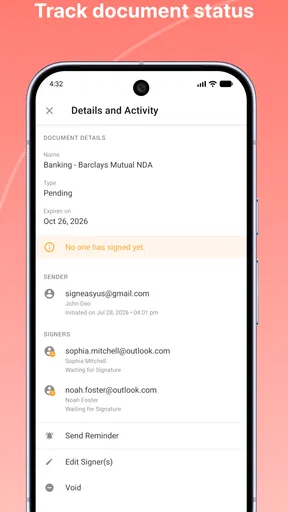
The main friction is not the act of drawing a signature; it is everything around it. A blurry camera image can make fields hard to read, a crowded page makes accurate placement slower, and a recipient may have a required process that differs from the one I would normally use. Cloud handoffs also depend on choosing the correct file and keeping track of which copy has been completed. Signeasy helps with the signing step, but it does not remove the need to verify the document, check the recipient’s requirements, and keep the finished version organized.
There is also a natural trade-off between convenience and screen size. A phone is great when I need to sign a straightforward form while away from my computer; it is less comfortable when I must scrutinize many pages or compare small print. In that case, I would read the document on a larger screen first and use the phone only for a quick completion if that makes sense. That is not a failure of the app so much as a reminder to match the tool to the work.
A sensible fit for the right kind of paperwork
Overall, Fill and Sign Docs: Signeasy has proven to be an incredibly useful tool in my digital toolkit. Its ease of use, combined with robust features for signing and managing documents, makes it a must-have for anyone looking to streamline their workflow. Whether you're a business professional or just someone tired of dealing with paper, this app is definitely worth a try.
My recommendation is strongest for people who often need to sign or complete straightforward PDFs and want to do it without returning to a desk. It is also handy when a form arrives unexpectedly and the next step is simply to fill the required fields and pass it along. Someone who rarely signs documents, prefers handwritten paper records, or needs extensive editing may be happier with their existing tools. I would test the whole route—from opening a sample file to checking the saved result—before making it part of an important recurring process.
So, if you're ready to ditch the printer and scanner for good, head over to the App Store or Google Play and give Signeasy a whirl. You might just wonder how you ever lived without it!
Pros
- User-friendly interface simplifies document signing.
- Supports a wide range of file formats.
- Secure encryption ensures data protection.
- Syncs across multiple devices seamlessly.
- Offers offline signing capability for convenience.
Cons
- Limited free version with basic features.
- Some file types may not render perfectly.
- Occasional syncing delays reported by users.
- Premium subscription can be costly for individuals.
- Requires internet for initial document upload.
FAQs for Fill and Sign Docs: Signeasy
What features does Signeasy offer for document signing?
Signeasy provides a comprehensive suite of features for document signing, including electronic signatures, document editing, and form filling. It supports various file formats like PDF, Word, and Excel, and allows users to add initials, dates, and text. The app also offers integration with cloud services such as Google Drive, Dropbox, and OneDrive for seamless access and storage.
Is Signeasy secure for handling sensitive documents?
Yes, Signeasy prioritizes the security of your documents by using industry-standard encryption to protect data during transmission and storage. The app complies with e-signature laws such as ESIGN and eIDAS, ensuring that your signed documents are legally binding. Additionally, Signeasy offers authentication measures to verify user identity, enhancing security further.
Can I use Signeasy offline?
Signeasy offers offline functionality, allowing users to sign documents without an internet connection. You can prepare and sign documents offline, and once you're back online, the app will automatically sync your changes. This feature is particularly useful for professionals who frequently travel or work in areas with limited connectivity.
What platforms is Signeasy available on?
Signeasy is available on both Android and iOS platforms, making it accessible for a wide range of smartphone and tablet users. The app is also accessible via web browsers, providing flexibility for users who prefer working on desktops or laptops. This cross-platform availability ensures that users can manage their documents anytime, anywhere.
Does Signeasy support multiple languages?
Yes, Signeasy supports multiple languages, catering to a global audience. This feature makes it easier for non-English speaking users to navigate the app and utilize its features effectively. The app's language settings can be adjusted within the app, ensuring a personalized and user-friendly experience for everyone.


